

Recruitee integration
Last updated: 30 March 2026
What does the integration do?
This integration links your Recruitee account with Revello. Revello uses a secure Personal API token to access Recruitee on your behalf, and subscribes to Recruitee webhooks so hiring activity - such as new candidates, pipeline moves, and job updates - can be reflected in Revello without manual exports.
Use it to keep your employee referral and hiring workflows aligned with what happens in Recruitee, with less copying and fewer missed updates.
Setting up the integration
Complete the steps in order. Revello will give you a dedicated webhook URL outside of this article - use that exact URL in Recruitee (do not share it publicly).
Step 1 - Personal API token
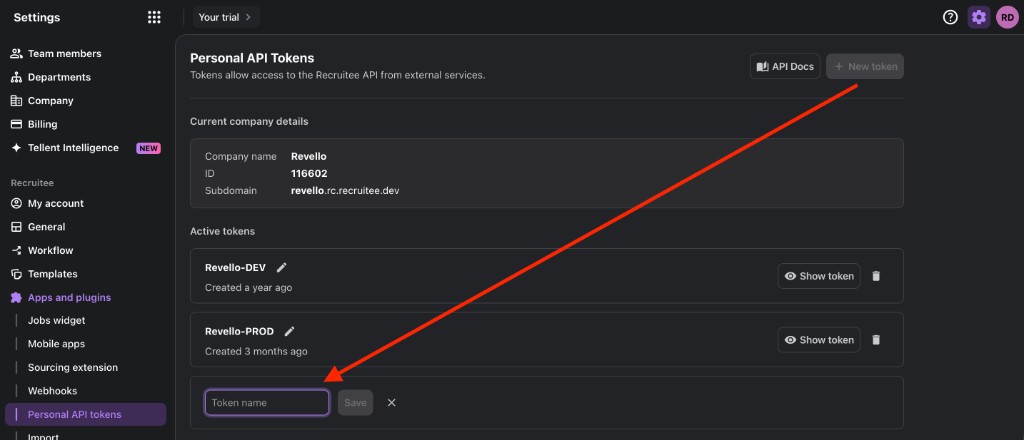
- In Recruitee, open Settings, then Apps and plugins, then Personal API tokens.
- Click + New token, enter a name for the token, and click Save.
- Copy the token and send it to the Revello team through the secure channel we agreed with you. Treat it like a password - do not post it in chat or email unless your security policy allows it.
Step 2 - Webhook
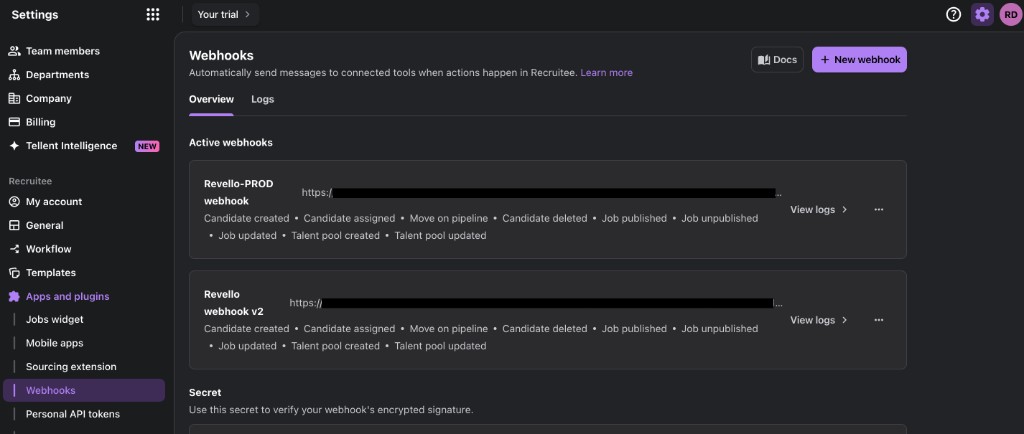
- Still under Apps and plugins, open Webhooks.
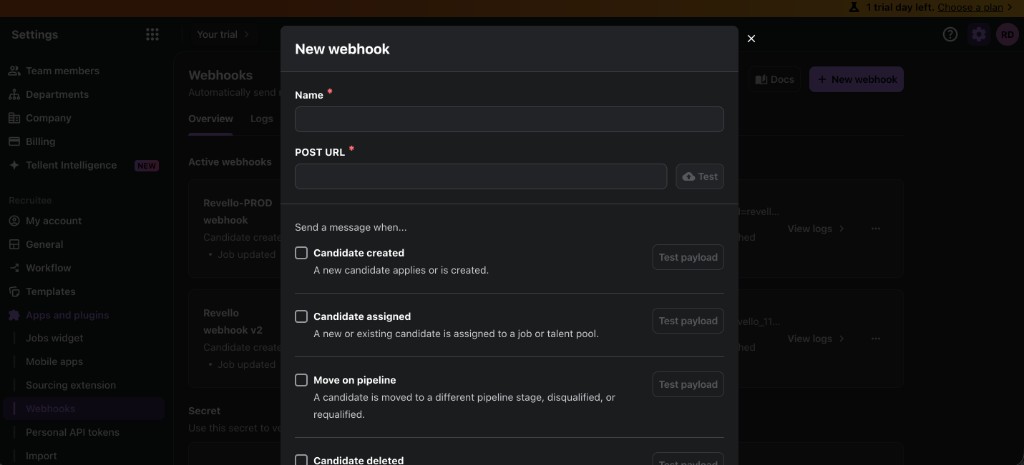
- Click + New webhook.
- Enter a clear Name (for example, "Revello integration").
- Paste the POST URL that Revello provided to you privately.
- Under Send a message when…, enable every event listed (all checkboxes). That ensures Revello receives the full range of signals needed for your integration.
- Save the webhook when Recruitee prompts you to confirm.
Step 3 - Test the webhook
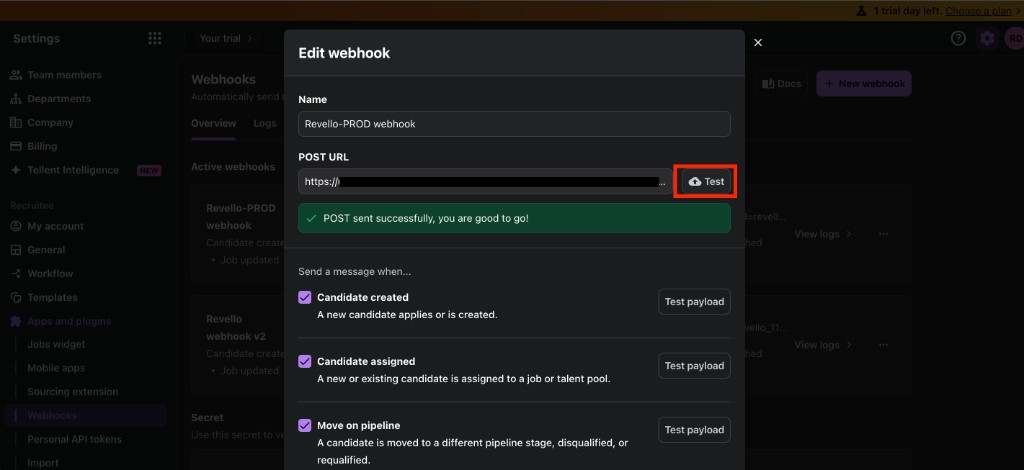
- Open the webhook you created (or use Edit).
- Click Test next to the POST URL.
- Confirm you see a success message (for example, that the POST was sent successfully). If the test fails, double-check the URL, HTTPS, and any firewall rules, then contact Revello support.
What data is shared?
Data flows from Recruitee to Revello when the events you enabled occur. Depending on your Recruitee setup and the events selected, payloads can include:
- Candidate-related: identifiers and profile fields needed to match or display a candidate, plus pipeline and assignment changes (for example: created, assigned to a job or talent pool, moved between stages, disqualified or requalified, deleted).
- Job-related: job metadata when jobs are published, unpublished, or updated.
- Talent pools: basic information when talent pools are created or updated.
Exact fields depend on Recruitee's webhook payload for each event. See Recruitee's documentation for API and webhook details. If you need a precise data map for compliance, ask Revello support and we will align with your configuration.
How can customers reach us?
For questions about this integration, email welcome@revello.ai.
FAQs
- Where do I get the webhook URL?
- Revello provides your organisation with a dedicated URL when we enable the integration. It is not published on this page.
- How is my API token handled?
- Share the token only through the secure channel we agree with you. Treat it as confidential credentials; rotate it in Recruitee if you believe it was exposed.
- The webhook test failed. What should I check?
- Verify the POST URL matches exactly what Revello sent (including
https://), that the webhook is saved, and that your network allows outbound HTTPS to our endpoint. If it still fails, contact us with the approximate time of the test. - Do I need to enable every webhook event?
- Yes - select all events in the dialog so Revello receives the full set of updates the integration is built for.